Overview
I wanted a repeatable note for rebuilding llama.cpp and running local GGUF models on my laptop GPU. The target machine is a Linux laptop with an NVIDIA RTX 4060 Laptop GPU and 8GB VRAM.
Small models are straightforward. The more useful part for me is getting larger MoE-style models to run locally with the right quantization, CUDA build, KV cache settings, and MoE offloading flags. With the setup below, I can get around 30 tok/s for chat-style inference, depending on the model and prompt.
This is a general guide, so the commands use placeholder model paths instead of my personal model names.
Setup
This example uses Arch Linux and an NVIDIA GPU.
Install the basic build tools:
sudo pacman -S git base-devel cmake
Check that the NVIDIA driver is available:
nvidia-smi
Check that the CUDA toolkit is available:
nvcc --version
If either command is missing, install the NVIDIA driver and CUDA toolkit for your system before building llama.cpp.
On Arch, the packages are usually:
sudo pacman -S nvidia-dkms nvidia-utils nvidia-settings cuda
Clone llama.cpp
Clone the repository:
git clone https://github.com/ggml-org/llama.cpp
cd llama.cpp
Build with CUDA
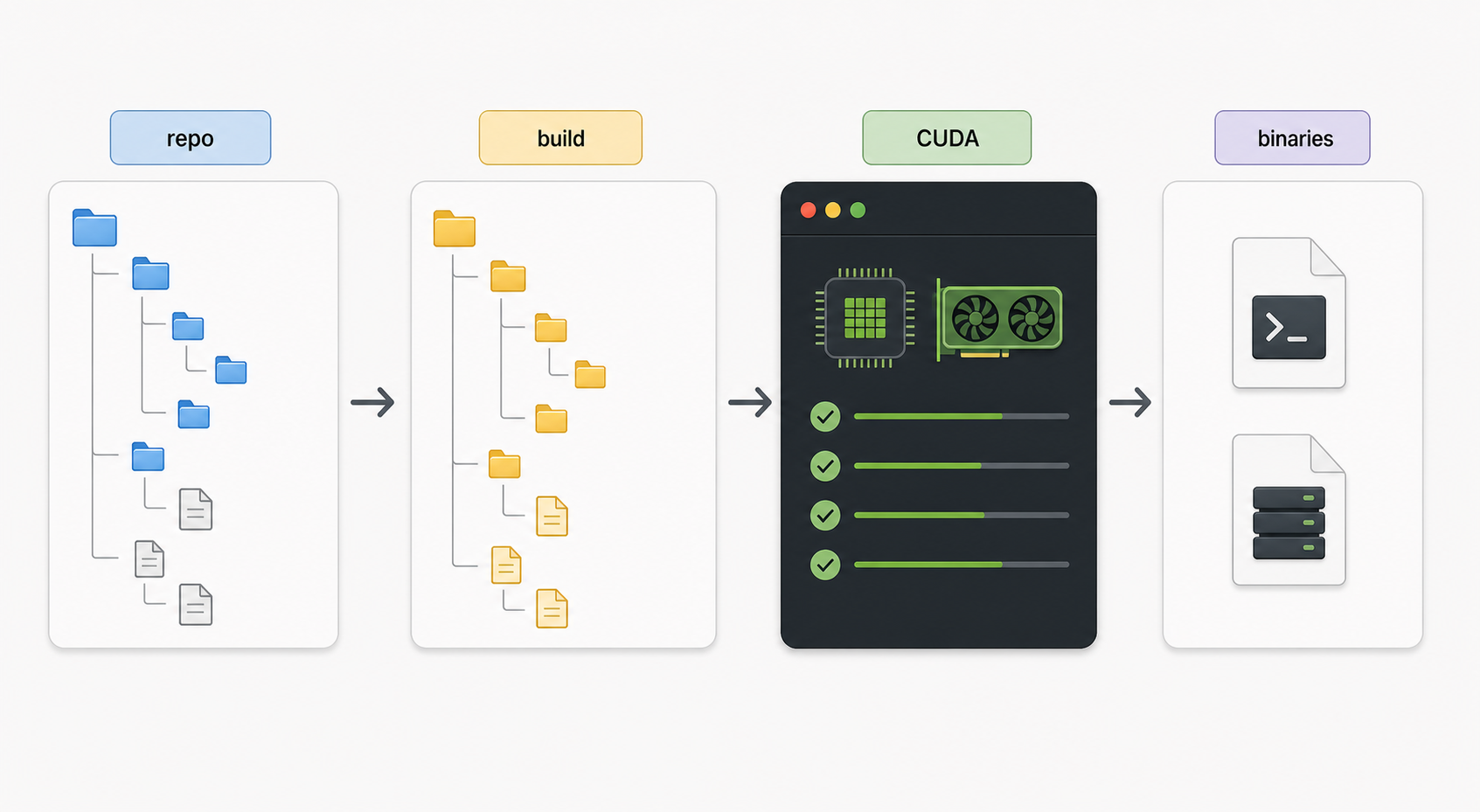
Generate the build files with CUDA enabled:
cmake -B build \
  -DGGML_CUDA=ON \
  -DCMAKE_BUILD_TYPE=Release \
  -DLLAMA_BUILD_TESTS=OFF
Build it:
cmake --build build --config Release -j 16
Verify that the binary works:
./build/bin/llama-cli --version
Basic server command
The main binary I use for local serving is llama-server.
A basic CUDA-backed server command looks like this:
./build/bin/llama-server \
  --model /path/to/model.gguf \
  --ctx-size 8192 \
  --n-gpu-layers all \
  --flash-attn on \
  --cache-type-k q8_0 \
  --cache-type-v q8_0
This starts a local server using a GGUF model.
| Flag | Purpose |
|---|---|
--model | Path to the local .gguf model file |
--ctx-size | Context window size |
--n-gpu-layers | Number of model layers to offload to the GPU |
--flash-attn on | Enables flash attention when supported |
--cache-type-k | Quantization type for key cache |
--cache-type-v | Quantization type for value cache |
For smaller models, q8_0 KV cache is a good starting point. For larger models or limited VRAM, q4_0 can reduce memory usage.
Running larger models on 8GB VRAM
For larger models, I usually lower KV cache precision and tune the CPU/GPU split.
A more memory-conscious command looks like this:
./build/bin/llama-server \
  --model /path/to/model.gguf \
  --n-gpu-layers 99 \
  --ctx-size 65536 \
  --threads 8 \
  --threads-batch 12 \
  --batch-size 1024 \
  --ubatch-size 512 \
  --flash-attn on \
  --cache-type-k q4_0 \
  --cache-type-v q4_0 \
  --mlock
These values are not universal. They depend on the model, quantization, system RAM, VRAM, and how much context you actually need.
MoE model flags
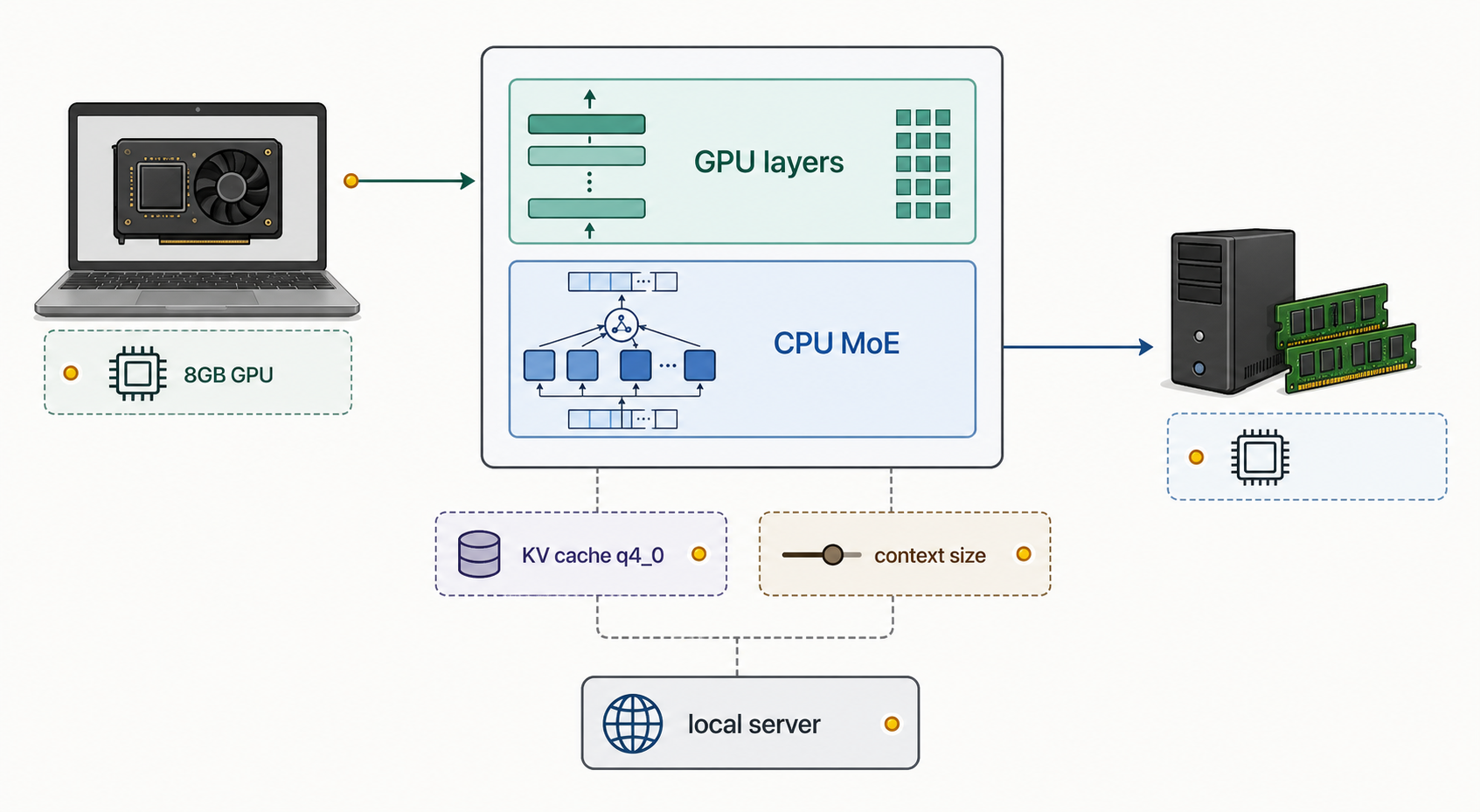
For MoE models, the flag that made the biggest difference for me was CPU MoE offloading:
./build/bin/llama-server \
  --model /path/to/moe-model.gguf \
  --n-gpu-layers 99 \
  --n-cpu-moe 31 \
  --ctx-size 65536 \
  --threads 8 \
  --threads-batch 12 \
  --batch-size 1024 \
  --ubatch-size 512 \
  --flash-attn on \
  --cache-type-k q4_0 \
  --cache-type-v q4_0 \
  --mlock
Useful MoE-related tuning points:
| Setting | What I adjust |
|---|---|
--n-cpu-moe | Moves some MoE work to CPU to fit the model better |
--ctx-size | Lower this first if memory usage is too high |
--batch-size | Higher can improve prompt processing, but uses more memory |
--ubatch-size | Smaller values can be easier on VRAM |
q4_0 KV cache | Helps fit larger contexts or models into limited VRAM |
On my RTX 4060 laptop GPU with 8GB VRAM, this kind of setup can reach around 30 tok/s for local chat inference, depending on the model and prompt.
Serving on the local network
If I want another local app to connect to the server, I bind it to all interfaces and choose a port:
./build/bin/llama-server \
  --model /path/to/model.gguf \
  --n-gpu-layers 99 \
  --ctx-size 65536 \
  --threads 8 \
  --threads-batch 12 \
  --batch-size 1024 \
  --ubatch-size 512 \
  --flash-attn on \
  --cache-type-k q4_0 \
  --cache-type-v q4_0 \
  --host 0.0.0.0 \
  --port 8080
Use this only on a trusted network. For a laptop setup, I usually keep it local unless another tool needs to connect.
Benchmarking
llama-bench is useful before settling on a server command.
A simple benchmark:
./build/bin/llama-bench \
  --model /path/to/model.gguf
A more useful benchmark for tuning threads and generation speed:
./build/bin/llama-bench \
  --model /path/to/model.gguf \
  --n-gpu-layers 99 \
  --flash-attn 1 \
  --cache-type-k q4_0 \
  --cache-type-v q4_0 \
  -p 1024 \
  -n 512 \
  -t 4,6,8,10,12,14 \
  -r 3
To compare batch and micro-batch sizes:
./build/bin/llama-bench \
  --model /path/to/model.gguf \
  --n-gpu-layers 99 \
  --flash-attn 1 \
  --cache-type-k q4_0 \
  --cache-type-v q4_0 \
  -p 1024 \
  -n 512 \
  -t 8 \
  -b 512,1024,2048,4096 \
  -ub 256,512,1024 \
  -r 3
The two numbers I watch are:
| Metric | Meaning |
|---|---|
pp | Prompt processing speed |
tg | Token generation speed |
For chat usage, token generation speed is what I feel most. Prompt processing matters more when sending long context or using coding assistants.
Tuning notes
These are the settings I usually adjust first:
- Lower
--ctx-sizeif the model does not fit. - Use
q4_0for--cache-type-kand--cache-type-vwhen VRAM is tight. - Tune
--n-cpu-moefor MoE models. - Keep
--flash-attn onenabled when the build and GPU support it. - Benchmark
--threads,--batch-size, and--ubatch-sizeinstead of guessing.
A good starting point for an 8GB laptop GPU is a quantized GGUF model, CUDA enabled, flash attention on, and conservative batch sizes. From there, raise context and batch settings slowly until memory or speed becomes a problem.
Current working pattern
For my laptop, the pattern that works best is:
./build/bin/llama-server \
  --model /path/to/model.gguf \
  --n-gpu-layers 99 \
  --ctx-size 65536 \
  --threads 8 \
  --threads-batch 12 \
  --batch-size 1024 \
  --ubatch-size 512 \
  --flash-attn on \
  --cache-type-k q4_0 \
  --cache-type-v q4_0 \
  --mlock
For MoE models, I add:
--n-cpu-moe 31
That value is hardware and model dependent, but it is the first knob I check when trying to fit a larger MoE model on limited VRAM.
TODO: Add exact hardware details, RAM size, and a small benchmark table from the final stable setup.